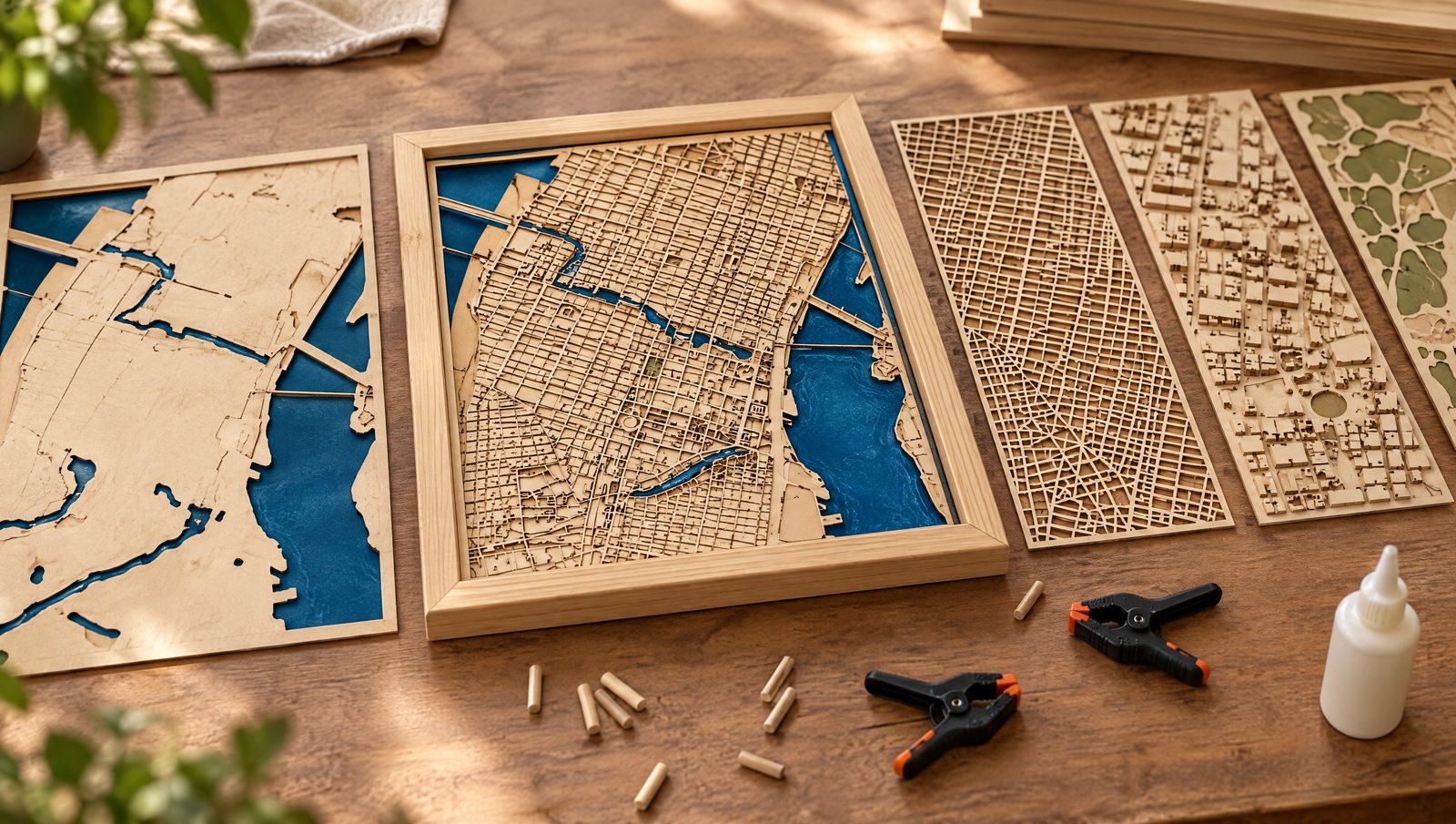
A layered map is only as good as its assembly. Parts that come out a little small, layers that creep while you clamp them and a base that bows a month later are the problems makers ask about most. This guide covers kerf, alignment, glue and warping with numbers from data sheets, using a layered city map as the running example.
Quick answer
- Kerf: published values run about 0.08–0.20 mm for a diode in thin plywood (ZapCraft) and 0.26–0.62 mm for a CO2 service in 2–5 mm plywood (Sculpteo). Measure your own.
- Kerf offset matters most where one part drops into another. Put the whole kerf on one part or half on each.
- Alignment: a jig around the outline, outside edges first, one layer at a time.
- Glue: PVA wood glue gives you 4–6 minutes of open time (Titebond). Water-based glue can warp thin sheets, so use little of it.
- Warping: hold sheets flat while cutting, and store and assemble at the humidity the piece will live in. At 50% humidity, wood settles around 9.2% moisture (USDA).
How is a layered map stacked?
Every layered map is a stack of flat sheets, each carrying one kind of feature. Our 3D city maps (Viperys Wall Art, our own shop) are built bottom-up: a base layer with the water cut out, a street layer, a layer of buildings and islands, and a parks layer. The layers are poplar plywood, the frame is solid pine, hand-waxed, and the water is real epoxy resin in three shades of blue, poured by hand and left to cure for 48 hours. You can see the layers on our craft page.
| Layer (bottom to top) | What it carries | Where assembly goes wrong |
|---|---|---|
| Base | Full outline; rivers and lakes cut out | Must stay flat; any bow shows in every layer above |
| Streets | The street network and many small blocks | Tiny parts, kerf, glue squeezing into narrow gaps |
| Buildings and islands | Raised blocks and islands | Parts must land exactly on their spot |
| Parks | Green areas on top | Small loose pieces, alignment |
| Frame | Solid wood around the stack | Must match the stack's outside edges |
Layer order as described on our craft page. Other makers add or merge layers; the problems stay the same.
Keep each layer as its own cut layer in LightBurn, so you can set passes and kerf offset per layer. A layered file from the Maperivo Laser Map Designer is a good starting point. Design basics are in how to make a layered wood map.
What is kerf, and why do parts come out small?
LightBurn defines kerf as "the gap of material removed by the beam". The beam follows the centre of your line, so half the kerf is lost on each side: every outer part comes out slightly small and every hole slightly big. The difference is "usually a fraction of a millimeter", but it adds up in a map with hundreds of edges.
Kerf is not fixed. Thunder Laser USA lists material, thickness, focal length, air pressure and cut direction (X vs Y) as factors. On the LightBurn forum, a maker cutting 3 mm MDF summed up the trade-off: low speed, high power and few passes "leave much more charring and a wider kerf", high speed, low power and many passes give a better cut but take longer. Purdue's fabrication lab adds that cut sides have "a 1 – 2 degree angle", and that features should be at least 0.04 in (about 1 mm) apart, "though 0.1″ is better" (about 2.5 mm). That last point matters for narrow blocks between streets.
For layers that only sit on top of each other, a few tenths of a millimetre rarely show. For parts that must fit into a cut-out, such as a park dropped into the street layer or an acrylic lake set into the base, kerf decides whether the part fits.
How wide is the kerf on a diode and on a CO2?
Ranges as published. Sculpteo cuts on 100 W CO2 lasers; xTool is a manufacturer figure. Kerf depends on focus, power, speed and direction, so measure your own machine. Source: ZapCraft diode kerf guide; Sculpteo plywood specs; xTool kerf guide
Data table
| Machine and material | Kerf width |
|---|---|
| Diode, thin plywood (ZapCraft) | 0.08–0.20 mm |
| CO2 service, ceiba 2 mm (Sculpteo) | 0.26–0.37 mm |
| CO2 service, poplar 3 mm (Sculpteo) | 0.28–0.50 mm |
| CO2 service, okoumé 3 mm (Sculpteo) | 0.31–0.36 mm |
| CO2 service, okoumé 5 mm (Sculpteo) | 0.39–0.47 mm |
| CO2 service, poplar 5 mm (Sculpteo) | 0.47–0.62 mm |
| Wood and plastics, general (xTool) | 0.25–0.51 mm |
ZapCraft, an independent laser guide, says that on many diode systems cutting thin plywood, kerf "often falls around 0.08–0.20 mm". Ponoko, a cutting service, says its kerf "starts at about 0.2mm" and averages 0.2 mm in 3 mm clear acrylic. Sculpteo, which cuts on 100 W CO2 lasers, publishes 0.28–0.5 mm for 3 mm poplar plywood and 0.31–0.36 mm for 3 mm okoumé. Purdue gives a typical kerf of about 0.011 in (about 0.28 mm). xTool quotes 0.25–0.51 mm for wood and plastics, within a general range of 0.08 to 1 mm.
Two things stand out. Poplar's range at Sculpteo is wide (0.28–0.5 mm in 3 mm), wider than okoumé's, so measure poplar more than once. And diodes are not round: LightBurn notes that "some diodes have a rectangular-shaped dot that result in a different Kerf (and power) on the vertical and horizontal axes". Thunder Laser explains why: diode light comes from "a flat, rectangular semiconductor surface".
How do you set kerf offset in LightBurn?
- Measure. Cut LightBurn's vernier kerf test at offset 0, read the vernier value and divide by 40. LightBurn's own example: 2.3 / 40 = 0.0575 mm.
- Enter it. Kerf Offset sits in the Cut Settings Editor, in Line mode. Positive values expand a shape outward, negative values shrink it inward.
- Trust the inner shapes. "Shapes that lie within other shapes on the same layer will have the offset direction inverted", so holes come out the right size too.
- Close your paths. The offset "only works with shapes that are closed". An open street line is not offset.
- Split it for inlays. Makers on the LightBurn forum put the whole kerf on one part or half on each side of the fit; Thunder Laser USA advises offsetting the tool path by half the kerf.
- Handle X and Y. Kerf Offset "does not have an X or Y component" (LightBurn forum). For a rectangular diode spot, LightBurn suggests using the larger value or rotating the design 45 degrees.
A forum tip worth copying: calibrate your machine's dimensions with engraved marks first, then measure kerf with cuts. Otherwise a scale error ends up hidden in the kerf setting.
How do you keep sheets flat while cutting?
A bowed sheet cuts unevenly because part of it sits out of focus: Glowforge notes that warped material "may not yield consistent cuts", and Craft Closet that it leads to incomplete cuts. On the LightBurn forum, a diode user measured bed height varying from +0.3 to −1.3 mm across the work area and fixed the cuts by slowing down and running 3 passes.
- Honeycomb pins "apply gentle downward force" (Craft Closet). Heavy warp can pop them out (Glowforge forum).
- Magnets and screws: Glowforge forum users use rare-earth magnets and wall-anchor screws with washers; Creatorally holds sheets to the honeycomb with small wooden blocks and screws.
- No soaking: Creatorally warns that plywood soaked and pressed flat "often dries unevenly". Thunder Laser USA does suggest immersing thin plywood in water to avoid scorching. For layers that must stay flat, soaking works against you.
Why do layers warp after cutting, and how should you store wood?
Wood takes up and gives off moisture until it matches the air around it. The US Forest Products Laboratory calls this the equilibrium moisture content (EMC). At 21.1 °C it is 6.2% at 30% relative humidity, 9.2% at 50% and 12.0% at 65%. Wood moves most tangentially, about half as much radially and only 0.1–0.2% along the grain. The handbook says wood should be used at a moisture content "as close as possible" to what it will see in service, and that wood in humid storage regains about 2% moisture per month over the first 45 days.
The German plywood shop wood4pros gives practical rules: store boards flat, not on edge, at 40–60% relative humidity, and let them acclimatise in the workshop for at least 24–48 hours. The US moisture targets in the handbook are regional, so use the humidity figures with your own hygrometer. Cut and glue all layers of one piece from sheets that have lived in the same room. Titebond adds a gluing limit: wood above 16% moisture may keep its glue from drying.
How do you line up the layers?
- Build a jig. ScreenPrinting.com surrounds the outline with "a slightly larger box to create a secure frame". Cut it from scrap in the same job, so it matches the parts.
- Engrave marks. Mr Carve engraves "alignment marks in the corners of each layer".
- Edges first. "Aligning the outside edges is probably most important" (Shamblog, a maker's topo map build).
- One layer at a time. Danielle Wethington: "I did each layer one at a time to minimize any risk of shifting."
- Clamp gently. "Tightening clamps can cause pieces to shift or twist" (Shamblog).
To engrave onto a layer you have already cut, LightBurn's Print and Cut aligns the job to two "Target Positions — also called registration marks". It needs a homed gantry laser and absolute coordinates, and you jog the head to each crosshair.
Which glue should you use for stacked layers?
There is no single right glue. A roundup of maker answers on OMG Laser lists CA glue, CA with accelerator, Titebond III, E6000, glue stick, 3M double-sided tape and pre-applied adhesive sheets. The numbers below come from each product's data sheet.
| Adhesive (example) | Working time | Clamp and cure | Limits | Notes |
|---|---|---|---|---|
| PVA wood glue (Titebond Original) | Open 4–6 min, total assembly 10–15 min at 21 °C / 50% RH | Clamp 30–60 min (unstressed), 24 h (stressed) | Use above 10 °C; not for exterior | Dries translucent, sands well; thin with up to 5% water |
| Spray adhesive (3M Super 77) | Bonding range 15 s–15 min; dry 15–60 s | No clamping data | Shear fails at 66 °C | Bonds paper, felt, cloth, wood, hardboard; 51% VOC |
| Transfer tape (3M 467MP) | Bonds under pressure | Lamination pressure 1.5–20 psi | Short-term heat to 204 °C; apply at 15.6–38 °C | 0.06 mm film; data sheet says nothing about laser cutting |
| Medium CA (Starbond) | Cures in about 10–15 s; 5 s with accelerator | Strong in 10–15 min, full in 10–15 h | Accelerator is over 50% acetone and may damage paint | About 150 cP; thick CA for very porous wood |
| 5-minute epoxy (Loctite) | Join within 40 s; sets in 5–7 min at 20–25 °C | Usable in 20 min, full cure 24 h | Service −23 to 49 °C | Does not shrink; cures translucent yellow |
Manufacturer data sheets and FAQs, checked 24 September 2026. Axminster lists open/closed times of 5/10 min for Titebond Original and II, 10/20 for III and 15/25 for Extend.
How to read it: PVA suits full-area wood-to-wood layers when you can clamp or weight them. CA saves clamping on tiny parts such as parks and islands, which is exactly where the OMG Laser question came from: "Wood glue hasn't been working well for me on the smaller parts!" Spray adhesive and transfer tape add no water, and 5-minute epoxy does not shrink as it cures.
Our cut-out city maps, cut from 6 mm A-grade Baltic birch plywood, are mounted with 3M double-sided tape and hung on hidden keyhole hangers. See a finished cut-out map. Our 3D maps combine poplar layers, a hand-waxed pine frame and hand-poured epoxy water.
How do you glue without warping or squeeze-out?
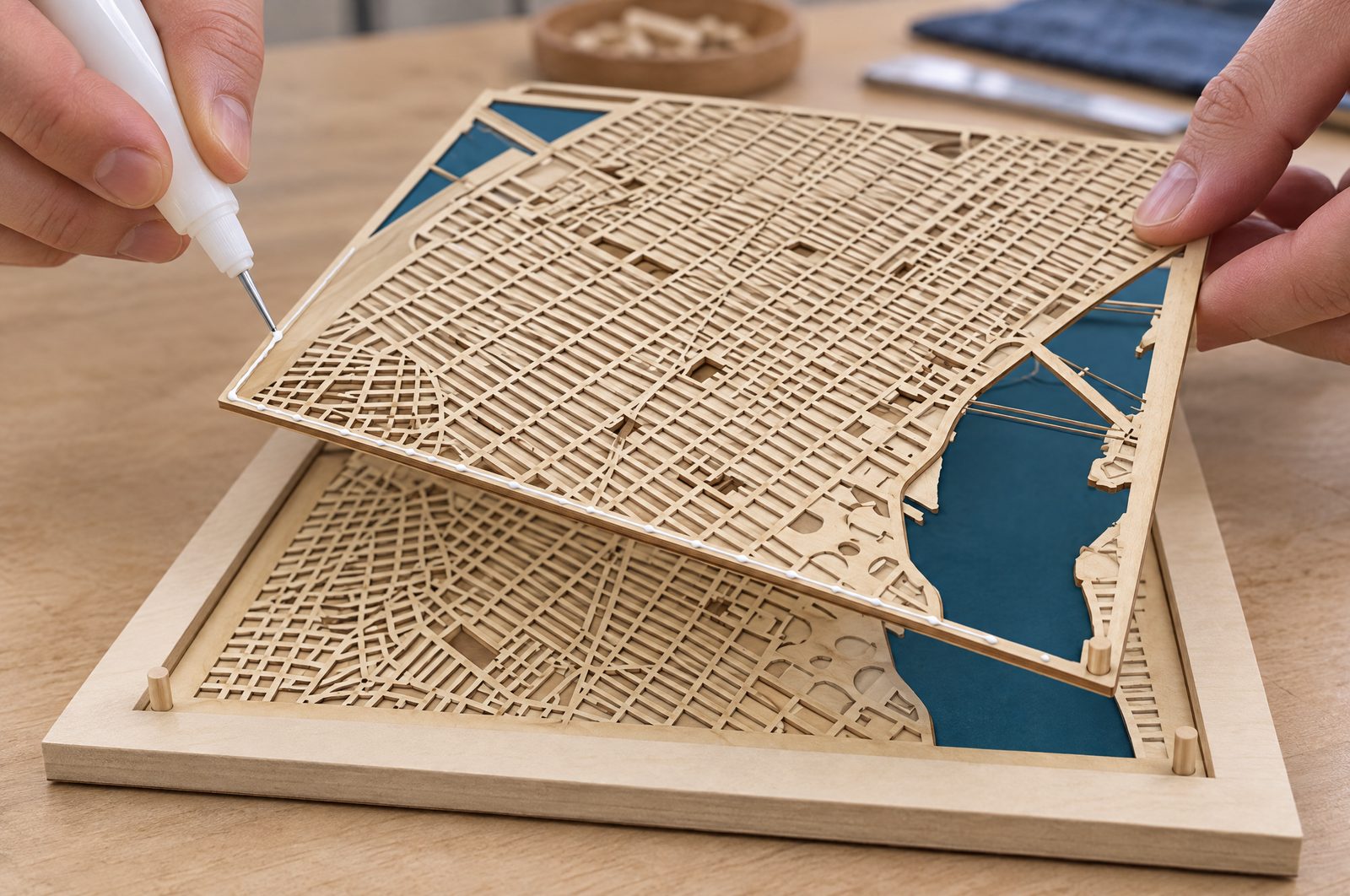
- Less water, less warp. In a Sawmill Creek thread on laminating plywood, a woodworker warned that "water-based adhesives introduced will almost certainly cause warping". The alternatives suggested were polyurethane construction adhesive, epoxy and contact cement, or "a web of yellow glue broadcast over one sheet" instead of a full coat. Makers in the OMG Laser roundup use a glue stick on 1/16 in layers for the same reason.
- Less glue than you think. "Clamps also squeeze out a lot of extra glue, so you probably need less than you think" (Shamblog). Titebond's spread rate is about 6 mils (0.15 mm).
- Even pressure. Titebond's data sheet lists 100–150 psi for softwoods and 175–250 psi for hardwoods. Those figures are for structural joints; for decorative layers, keep pressure even and watch for creeping parts.
- Warm enough, dry enough. Above 10 °C, and wood below 16% moisture (Titebond).
Adhesive sheets under the laser: pre-applied adhesives such as DualTite are marketed for "laser-cut materials" with the advice "Apply Before Cutting", but the page gives no technical data. Emory TechLab bans lasering "self-adhesive materials" because they "may use glue with chlorine-containing adhesive", and the 3M 467MP data sheet does not mention laser cutting. Do not laser through an adhesive unless its safety data sheet rules out chlorine.
Squeeze-out and epoxy water: ArtResin lists wax, grease, silicone, tape adhesive, stain oils and hand lotion as causes of bare spots, and says porous wood needs a seal coat. We found no source on whether dried PVA squeeze-out causes the same problem, so treat it as unknown and test on an offcut. The pour itself is covered in finishing laser-cut wood and epoxy resin.
How do you frame and hang a layered map?
Our 3D maps sit in a solid pine frame; our cut-out maps hang on hidden keyhole hangers. Sizes run from 20×20 cm to 45×90 cm (see our size guide). Whatever you build, weigh the finished piece before you choose hardware.
| Finished weight or case | Hardware | Source |
|---|---|---|
| Any framed piece | D-rings about 1/4 to 1/3 of the frame height down from the top | CustomPictureFrames.com |
| Over 5 lb (2.3 kg) | D-rings with wire, more secure than a sawtooth hanger | CustomPictureFrames.com |
| Up to 15 lb (6.8 kg), frame up to 24×36 in (61×91 cm) | Command Large strips, four pairs; not on wallpaper, fabric, textured walls or brick | Command (3M) |
| Over 25 lb (11.3 kg) | Into a stud or heavy-duty anchors; French cleat | CustomPictureFrames.com |
Metric values are our conversions.
Troubleshooting: what went wrong with my layers?
| Problem | Likely cause | What to do |
|---|---|---|
| Parts loose in their holes | Kerf not compensated | Measure kerf; set Kerf Offset; split it on inlays (LightBurn) |
| Fit differs left-right vs up-down | Rectangular diode spot | Use the larger kerf or rotate 45° (LightBurn) |
| Some blocks not cut through | Glue pocket, knot, or sheet out of focus | Check the sheet; pins, magnets or screws; test cut |
| Layers shifted after clamping | Clamps pushed parts; too many layers at once | Jig, outside edges first, one layer at a time |
| Layer bowed after gluing | Too much water-based glue on a thin sheet | Thin spread, or a water-free adhesive |
| Glue stays soft | Wood over 16% moisture or room under 10 °C | Dry the wood, warm the room (Titebond) |
| Map bowed weeks later | Built at a different humidity from where it hangs | Acclimatise sheets; assemble at in-service humidity (USDA) |
| Bare spots in the epoxy water | Contamination or unsealed wood | Seal the wood, keep wax and oils away (ArtResin) |
Choosing the sheets themselves is covered in our laser plywood guide for diode and CO2, and cut-versus-engrave decisions per layer in cut vs engrave layers explained.
Sources
Checked 24 September 2026. Every page below was opened and read. Data sheet numbers are quoted as published; brand pages are marked as claims; forum and blog posts are reported as individual experiences. Unit conversions are ours.
- LightBurn docs — Kerf offset test guide (2.1)
- LightBurn docs — Print and Cut
- LightBurn forum — Kerf offset and calibration (29 Jul 2024); Offset / kerf when fitting one cut-out into another (15 Oct 2023)
- LightBurn forum — More passes or more power or less speed (Apr 2021); Consistency of cutting 3 mm plywood (May 2022)
- ZapCraft — Diode laser kerf test (30 May 2026, updated 29 Jul 2026)
- Ponoko — How much material does the laser burn away?
- Sculpteo — Plywood for laser cutting
- Purdue BIDC — Laser cutting troubleshooting FAQs
- xTool — Laser cutting kerf (2 Dec 2023)
- Thunder Laser USA — Understanding kerf and kerf offset; Preventing burning when laser cutting (19 Dec 2020); Thunder Laser wiki — CO2 vs diode lasers
- Glowforge — Cut didn't go through material; Glowforge forum — Hold downs for warped wood (24 Feb 2019)
- Craft Closet — Honeycomb pins (31 Mar 2021); Creatorally — How to flatten bent plywood (17 Jul 2024)
- USDA Forest Products Laboratory — Wood Handbook, ch. 4; ch. 12
- wood4pros — Was tun, wenn das Holz sich beim Lasern verzieht (23 Oct 2025)
- ScreenPrinting.com — 3D laser-cut ornaments with a jig (23 Dec 2024); Mr Carve — How to laser cut a map (21 Nov 2025)
- Danielle Wethington — Layered map (updated 2 Sep 2024); Shamblog — Making a laser-cut topo map: the build phase (19 Dec 2015)
- Titebond Original — product sheet; Titebond FAQ; Axminster — Which Titebond glue for you (13 Dec 2022)
- 3M Super 77 — technical data sheet (Apr 2025); 3M 467MP — technical data sheet
- Starbond — Medium CA glue; Starbond FAQ
- Henkel — Loctite 5 Minute Epoxy technical data sheet (22 Apr 2025)
- Sawmill Creek — Laminating layers of plywood together (17 May 2016); OMG Laser — Glue for multi-layered wood projects (30 Dec 2025)
- Creative Cut Supplies — DualTite adhesive (21 Jul 2025); Emory TechLab — Prohibited laser cutter materials
- ArtResin — Bare spots (2 Apr 2024)
- CustomPictureFrames.com — Installing hanging hardware (2 May 2026); Command — Large picture hanging strips, 15 lb