Transparency: some links in this guide are affiliate links. If you buy through them, Maperivo may earn a commission at no extra cost to you. It does not change what we recommend.
A diode laser is cheap to run and easy to live with, but it has hard limits that no setting removes. This guide covers what a 450 nm diode can and cannot cut, what the thickness claims really mean, and the focus, air, LightBurn and safety habits that separate clean work from charred work.
Quick answer
- A blue diode cannot cut clear or blue acrylic; most sources add white. Opaque red, orange, yellow, green and black work.
- Read thickness figures as claims. “One pass” numbers are the maker's best case, and watts can be optical or electrical.
- Check focus with a ramp test, even if your laser has a gauge.
- Air assist low for engraving, high for cutting, switched per layer if your pump allows it.
- In LightBurn: run a Material Test before every new material, keep speed units consistent, turn on overscan, set
$32=1. - Glasses must match 450 nm with the OD printed on them. Never leave the laser running alone.
What makes a diode different from other lasers?
Three facts explain almost every diode habit.
- Visible blue light. Blue diodes work at about 450 nm (xTool, Thunder Laser); Sculpfun lists 455±5 nm. A CO2 laser works at 10.6 µm. Visible light reflects off or passes through some materials that a CO2 beam would cut.
- Optical watts. Sculpfun writes next to its power ratings: “note that this is light energy not electrical energy”. Older listings and forum posts do not always say which one they mean, so a “40 W” in a 2021 thread may not compare with a “40 W” on a current spec sheet.
- A rectangular spot. Diode light comes from “a flat, rectangular semiconductor surface”, which gives an elliptical beam (Thunder Laser). Stronger modules tend to have larger spots, and Sculpfun's S30 spec pages show that pattern too. A Bambu Lab forum user reports about 0.03 × 0.14 mm for a 10 W module and 0.14 × 0.2 mm for a 40 W. xTool itself recommends its 10 W for “high-resolution engravings” and the 40 W for cutting.
So more watts cut thicker and faster, but fine engraving can look better on a smaller module. If you are still choosing a machine, see which laser engraver to buy.
What can a 450 nm diode cut, and what not?
xTool: 450 nm light “passes through the clear acrylic”. Darkly Labs, which makes the Emblaser diode, explains blue: “Blue acrylic appears blue because it reflects light predominantly in the blue wavelength”, so most of the power bounces off.
| Material | Cut with a blue diode? | Notes and source |
|---|---|---|
| Plywood, basswood, solid wood | Yes | Thickness depends on power and passes (next section) |
| Opaque black acrylic | Yes | xTool claims 15 mm in one pass with its 40 W module |
| Opaque red, orange, yellow, green acrylic | Yes | Darkly Labs; xTool claims 5 mm in one pass at 20 W |
| Clear or transparent tinted acrylic | No | Light passes through (xTool, Darkly Labs, Bambu Lab wiki) |
| Blue acrylic | No | Reflected (Darkly Labs, xTool support) |
| White acrylic | Sources disagree | No: xTool support, Darkly Labs, Bambu Lab. Yes: an xTool Academy FAQ |
| Pastel acrylic, mirror acrylic with a clear base | No | Darkly Labs |
| Acrylic with a surface coating | Engrave only | Once the coating burns off, the power is reflected again (Darkly Labs) |
| Clear acrylic under black paint or tape | Disputed workaround | Suggested by Creality Falcon; Darkly Labs says cutting stays impossible |
| Very pale plywood | Engraves worse | One maker found whiter plywood engraved poorly; a reply blames reflected light (LightBurn forum) |
| PVC, vinyl | Never | Banned by Stanford EHS (PVC) and Glowforge (vinyl, PVC) |
A diode cannot beat physics with more watts: a Bambu Lab forum user's 40 W module burned and cracked clear acrylic but did not cut it.
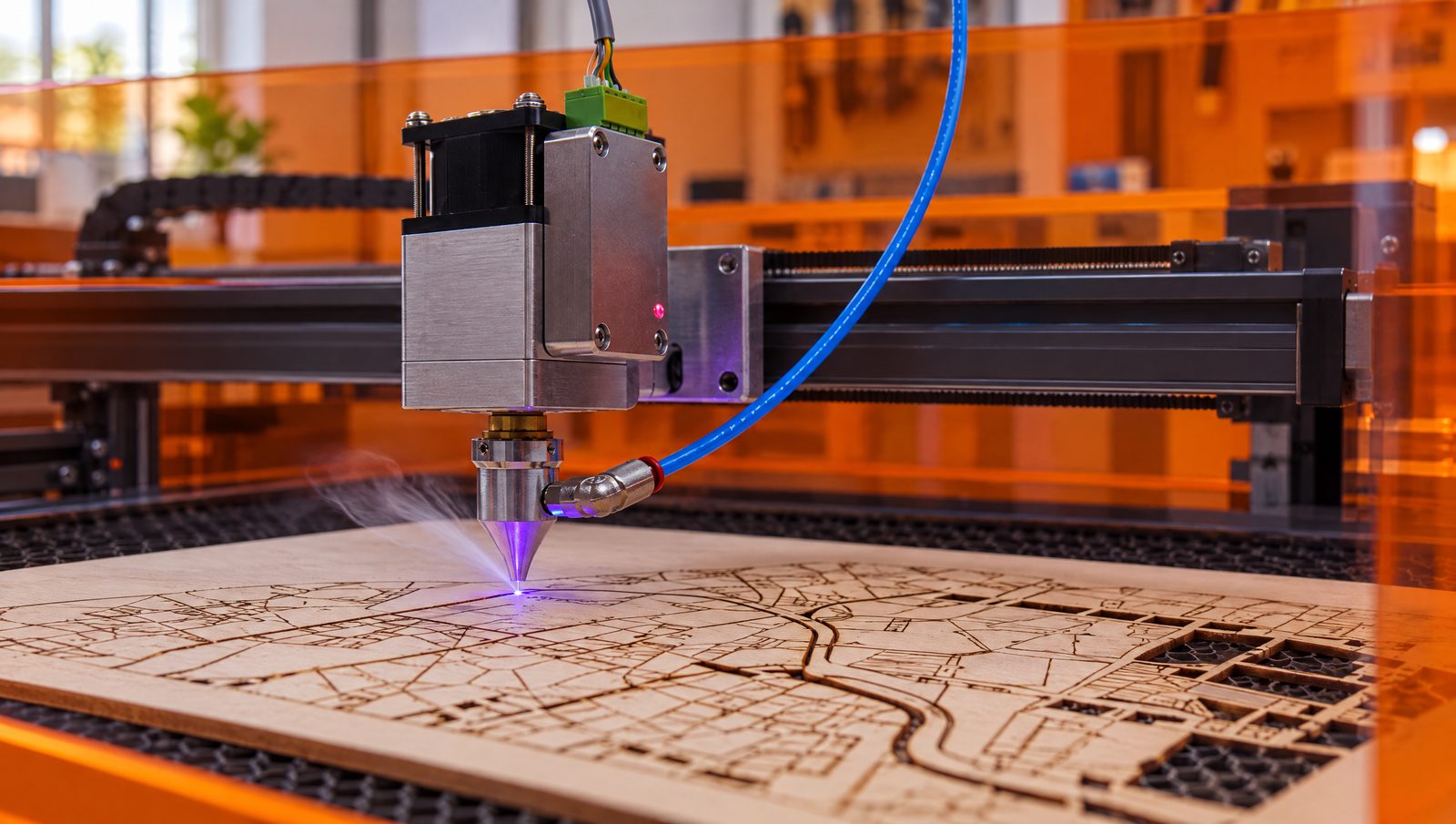
For a layered map this matters on the WATER layer. On a diode, cut it from opaque green or black acrylic, cut it from wood and paint it, or send it to a CO2. In our own 3D maps the water is hand-poured epoxy resin in three shades of blue, not acrylic (see Our craft at Viperys Wall Art, our own shop). The full colour and safety list is in our acrylic and plastics guide.
How thick can a diode really cut?
Every number below is a manufacturer claim or a single report, not an independent test. We found no independent, like-for-like thickness test per power class. Read “one pass” as the best case on ideal material.
| Module class | Claim or report | Who says it |
|---|---|---|
| 5 W | 3 mm plywood: 100 % at ~300 mm/min, 3–4 passes. 3 mm basswood: 100 % at 6 mm/s, 2 passes | Twotrees settings chart; CNCSourced guide |
| 10 W | 3 mm plywood: 90–100 % at ~600 mm/min, 2–3 passes. 3 mm basswood: 100 % at 6 mm/s, 1 pass | Twotrees; CNCSourced |
| 20 W | 10 mm basswood plywood and 8 mm solid wood in one pass | xTool (manufacturer claim) |
| 40 W | 18 mm hardwood in one pass; 18 mm poplar plywood in 6 passes at 300 mm/min; 10 mm pine in 4 passes at 700 mm/min | xTool's own tests (manufacturer claim) |
| “40 W” (rating type not stated) | 3 mm MDF at 200 mm/min, 50 %, 2 passes | One LightBurn forum user, 2021 |
Watts as stated by each source. xTool also says its 40 W S1 cuts 15 mm plywood in one pass, and that a CO2 cuts almost 500 % faster than its 40 W diode.
Look at the units. CNCSourced gives 6 mm/s, Twotrees gives about 300 mm/min. Converted, 6 mm/s is 360 mm/min, so the two are close. Type “6” into a mm/min field, though, and the head moves 60 times slower than intended: that is how a test cut turns into a charred groove. More on char in our guide to preventing burn marks.
How do you find the real focus?
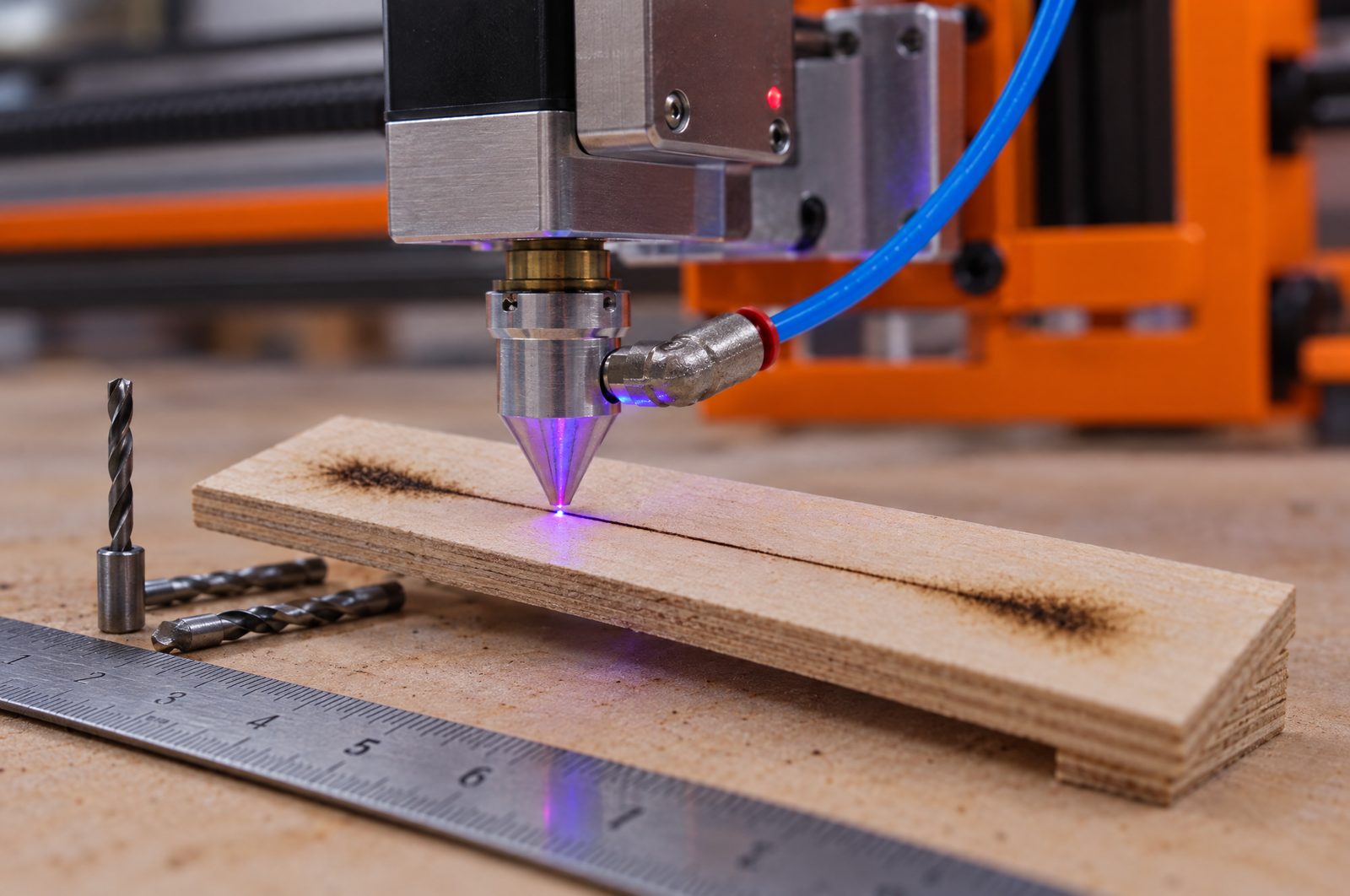
Diodes focus in one of three ways:
- Fixed focus with a gauge. Sculpfun's S30-series manual: “The focal length of the SCULPFUN laser module is fixed and cannot be changed.” Focus sits 50 mm or 40 mm below the edge of the aluminium shell, depending on the module, and a measuring column is supplied.
- Sliding module. Ortur's LU2-2 manual: loosen the thumbscrew, slide the module and look for “the position of the smallest light spot”, or use the focal gauge.
- Motorised Z. LightBurn's Focus Test needs a Z axis LightBurn can control. “The thinnest line in the engraving is the one that was run at the Z height closest to your laser's optimal focal height.”
Check the gauge anyway. On the LightBurn forum, one owner's gauge said 18 mm while the real focus was 19.5 mm, and the advice was to “always question a measurement tool”. That thread is about a CO2 laser, but the logic is the same. The ramp test is simple: prop up one end of a scrap strip, run a straight line along it, find where the line is thinnest, and measure the head height there. One forum user slides drill bits between head and ramp as feeler gauges.
Thick stock: LightBurn forum users set focus about halfway into the material; Twotrees moves it a third to half of the thickness. On machines with Z, LightBurn's “Z step per pass” shifts focus with each pass. Flatness: in one LightBurn thread about 3 mm plywood on a diode, the bed varied from +0.3 to −1.3 mm and cuts were inconsistent. Craft Closet puts it plainly: if the material is not flat, “parts of your design may be out of focus”. A large, thin map layer that bows is exactly that case.
When should air assist be high, and when low?
xTool: for engraving, nozzle air is “generally discouraged since strong airflow can diminish the engraving effect”; for cutting, use “a larger airflow”, with at least 2 mm between nozzle and material. xTool calls air “vital” for diodes, which “need to stay cool to perform well”; in its 1/4-inch plywood test, the cut went through only with air on. Sculpfun claims that for one S30 module, cutting with its air pump is “more than 5 times faster than airless”.
- Switch per layer. Sculpfun's S30 pages describe a mainboard-controlled pump (30 L/min) that LightBurn switches with M8. In LightBurn, GCode users assign M7 or M8 in the layer settings.
- Know when you can't. Makers on the LightBurn forum note that xTool's D and M series have only a manual pump switch.
- Stock pumps are gentle. Twotrees says they give “barely 2–5 PSI” and uses 30–40 psi for cutting. Pressure figures from several makers are compared in our burn-mark guide.
For maps, that means air off or low on the ENGRAVE layer with street names, and full air on the CUT layer. The Maperivo map generator exports those as separate layers.
How do you keep the lens clean?
Lens care affects power: xTool notes that cleaning “will improve the stability of the laser power”. But makers disagree on solvent, even within one brand:
| Module | What the maker says | Solvent |
|---|---|---|
| Sculpfun S30 Ultra | Remove the metal air nozzle, then brush inside. The lens is replaceable; Sculpfun claims that makes the module last “more than 10 times longer” | Brush; see manual |
| xTool D1 Pro | Clean lens and nozzle “at least once an hour” under heavy workload or in unfavourable conditions | Alcohol-free cloth or official kit |
| xTool M1 | “Clean the lens with a cotton swab moistened with alcohol” | Alcohol |
Follow your own module's manual. The same brand gives opposite solvent advice for two models.
How do you find settings without wasting material?
Use LightBurn's Material Test. It “creates a grid of test boxes with varying parameters”: power and speed by default, plus interval, passes and frequency “if your laser supports them”. It runs the boxes with the highest speed and lowest power first, which is the safe order. Presets exist for diode and CO2.
- The units trap. LightBurn warns: “make sure to use the same units of distance and time as those from the recommendation.” Diode settings are usually quoted in mm/min; many CO2 settings in mm/s.
- Every sheet is different. Thunder Laser: “even sheets with the same thickness may perform differently because of glue, moisture, wood species, resin content, and internal voids.”
- Test on the job material. Before cutting a full set of map layers, a small grid on an offcut of the same sheet costs minutes; a failed map costs a sheet.
Our LightBurn settings for laser maps show how to set up map layers.
What DPI and image mode should you use?
LightBurn: “DPI = 25.4 / Line Interval”, and you want “lines that just touch, without overlapping”. So the spot size sets the useful DPI. Our own arithmetic, not a vendor figure: a spot quoted at 0.08 mm gives 25.4 / 0.08 ≈ 318 DPI. The Diode Laser Wiki warns that spot specs are “usually absolutely incorrect! You can usually double it”. A 0.16 mm spot gives about 159 DPI. Two starting points a factor of two apart: run a DPI test strip instead of trusting either.
| Image mode | Use it for | What LightBurn says |
|---|---|---|
| Threshold | Pure black-and-white art, logos, text | For black-and-white images only |
| Jarvis | Photos | “Generally the best choice for smooth-shaded or photo images” |
| Dither | Photos | “The best choice for smoothly shaded images, like photos” |
| Grayscale | Shading by power | “Varies power output as a percentage between Min and Max Power” |
| Negative Image | Slate, glass | Intended for slate or glass |
| Pass-Through | Images already prepared elsewhere | Engraves without resampling |
LightBurn calls both Jarvis and Dither the best choice for photos. Test both on your wood.
Street names in a vector map file engrave as a fill, not as an image. Scanning offset (next section) matters most there: at speed, small letters get ghosted edges.
Why do line ends, corners and travel moves burn?
- Overscan. It “adds extra moves to the beginning and end of each line to give the laser space to speed up before firing”. Without it, line ends get more effective power and turn dark. DSP controllers overscan automatically; on GCode diodes you set it yourself, as a percentage of speed. Two catches: higher speeds can “paradoxically increase job time” because of the extra travel, and near the edge of the work area LightBurn warns “Cut may be out of bounds due to overscan settings”. Large maps near the edge hit this first.
- Scanning offset. “At higher speeds, belts will pull slightly as well.” LightBurn's example: “At 500 mm/second, that 1 millisecond delay means you'll be off by 5 dots, or ½ a millimeter.” Their procedure: engrave a 50 × 10 mm fill at 0.5 mm interval, test at least two speeds, measure the gap and enter half of it.
- Corners. GRBL has no Min Power (except in grayscale), so corners where the head slows burn darker. LightBurn suggests raising X/Y max acceleration “to 100-500”.
- Travel moves. If GRBL Laser Mode is off, the laser stays “on when moving between shapes”. Set
$32=1. Laser Mode also prevents pauses that cause “excessive burn spots when engraving images”.
How do you stay safe with an open diode?
A module rated at several watts of light is far above 500 mW, the line xTool gives for Class 4 (“> 500 mW”). An enclosed Class 1 machine has “no risk of exposure … during normal use”; an open frame does not.
- Glasses. OMTech: “OD5+ or OD6+ minimum for direct viewing/open-bed use”, standards EN 207/EN 208 or ANSI Z136, and wavelength and OD “physically etched or stamped”. “Never buy ‘universal’ laser glasses.”
- No simple rule. Laser Safety Industries: “there is not a universal rule such as: ‘A 1,000-watt blue laser requires OD X.’” The lens colour alone “should never be used” to judge eyewear.
- Bundled glasses. Make: magazine tested glasses bundled with a 2.5 W diode at “less than OD=2”: “a false sense of security”. Diffuse reflections are hazardous “over very short distances”. Even Opt Lasers, which sells OD 7+ glasses for 190–540 nm, says they “should not be relied upon as the sole means of eye protection”.
- Fire and fumes. xTool: “Never leave your laser unattended while it is running”. Stanford asks for an extinguisher (“e.g., ABC, carbon dioxide, or Halotron”), a dedicated exhaust to the outside, and bans PVC, PVB, PTFE and carbon fibre.
We make layered wooden city maps and build Maperivo. Our machines are a Sculpfun S30 (33 W) diode and an xTool P3 CO2. Several facts in this guide come straight from the Sculpfun S30-series manuals: fixed focal length, the supplied focus column, the nozzle that comes off for lens cleaning. Check your own manual; models differ.
Check price at Sculpfun →10 common diode mistakes
- Trying to cut clear, blue or white acrylic (xTool, Darkly Labs).
- Comparing electrical watts with optical watts.
- Trusting the focus gauge without a ramp test.
- Leaving GRBL Laser Mode off, so the beam burns trails between shapes.
- Mixing mm/min and mm/s in a test grid or a copied setting.
- Engraving without overscan, so every line ends in a dark dot.
- Running full air on fine engraving, which weakens the mark.
- Trusting bundled or orange-tinted glasses with no OD printed on them.
- Running one very slow pass and getting char; makers disagree on passes, so test both ways.
- Skipping a test on a new sheet, or leaving the laser running unattended.
Sources
Checked 24 September 2026. We opened every page below and took each number from it. Vendor figures are claims, forum posts are maker reports, and the DPI arithmetic is ours.
- xTool — Cut clear acrylic with a diode laser (11 Aug 2026), Acrylic and blue diodes (20 Nov 2024), xTool Academy: Laser cutting acrylic
- Darkly Labs — Cutting and engraving acrylic
- Bambu Lab wiki — Laser material types; forum: Laser cutting acrylic fail (28 Aug 2025), Laser 10 W vs 40 W (22 Mar 2025)
- xTool support — Choosing a laser module (13 Jul 2023), 40 W cutting tests (21 Jul 2023), Laser cutting plywood (15 Jun 2026)
- Twotrees — Laser engraver settings for beginners (diode) (11 Oct 2025) and How to stop charring (23 May 2026)
- CNCSourced — Laser cutting plywood (updated 3 Jan 2024)
- Sculpfun — S30 series, S30 Pro, S30 Pro Max, S30 Ultra upgrade kit
- Sculpfun manuals — S30 series user manual (PDF), S30 Ultra user manual (PDF)
- Ortur — LU2-2 laser module manual
- LightBurn docs — Focus Test, Material Test, Image Mode, Overscanning, Scanning offset, Corner power, GRBL Laser Mode, GRBL configuration, Shared settings, Line settings
- LightBurn forum — Is a ramp test required? (24 Jan 2023), Measuring ramp test distance (Dec 2023), Cutting with diode laser (22 Nov 2023), Diode laser air assist (Apr 2023), More passes or more power? (Apr 2021), Whiter plywood and diodes (Oct 2023), Consistency of cutting 3 mm plywood (May 2022)
- xTool — Air assist nozzle (4 Sep 2023), Is air assist worth it? (13 Sep 2023)
- xTool lens care — D1 Pro maintenance, M1 lens cleaning (14 Sep 2026)
- Diode Laser Wiki (Melvin Isken) — Guideline settings (22 Feb 2025)
- Thunder Laser — CO2 vs diode lasers and Plywood guide
- Clear-acrylic workaround — Creality Falcon (16 Jan 2026)
- Craft Closet — Use honeycomb pins to keep materials flat (31 Mar 2021)
- OMTech — Choosing the right safety glasses (14 Aug 2026)
- Laser Safety Industries — Glasses for a 445–450 nm blue laser
- Make: — Laser eye safety in digital fabrication (8 Feb 2025)
- Opt Lasers — 450 nm laser safety glasses
- xTool — Laser classification and safety (19 Oct 2023)
- Stanford EHS — Laser cutter safety guidance (PDF) (rev. 26 Sep 2024) and Glowforge — Safety